I’ve tested a range of AI chatbots for websites.
Many of them offer similar core functionality.
They sit in the corner. They say “Hi! How can I help?” They wait. They answer questions when someone clicks. They may collect an email or other contact information.
But having a chatbot doesn’t automatically mean better conversion results.
That’s one of the challenges of evaluating AI chatbots in 2026. Adding AI to a website is one thing. Understanding whether it contributes to meaningful business results is another.
This guide is different. I’m not going to list 15 tools and let you figure it out. I’m going to explain what separates chatbots focused primarily on answering questions from platforms designed to support website conversions.
Then I’ll show you what to look for.
The Problem With Every “Best AI Chatbot” Article
You’ve seen them. “Top 10 AI Chatbots for 2026.” “Best Chatbot Platforms Compared.”
They all do the same thing:
- List a bunch of tools
- Describe features from marketing pages
- Compare prices
- Leave you more confused than before

None of them ask the question that actually matters:
Does this chatbot generate more leads and sales than not having it?
That’s what you want, right? Not features. Results.
So let’s talk about what actually separates chatbots that work from chatbots that waste money.
The 5 Capabilities That Determine Whether a Chatbot Converts
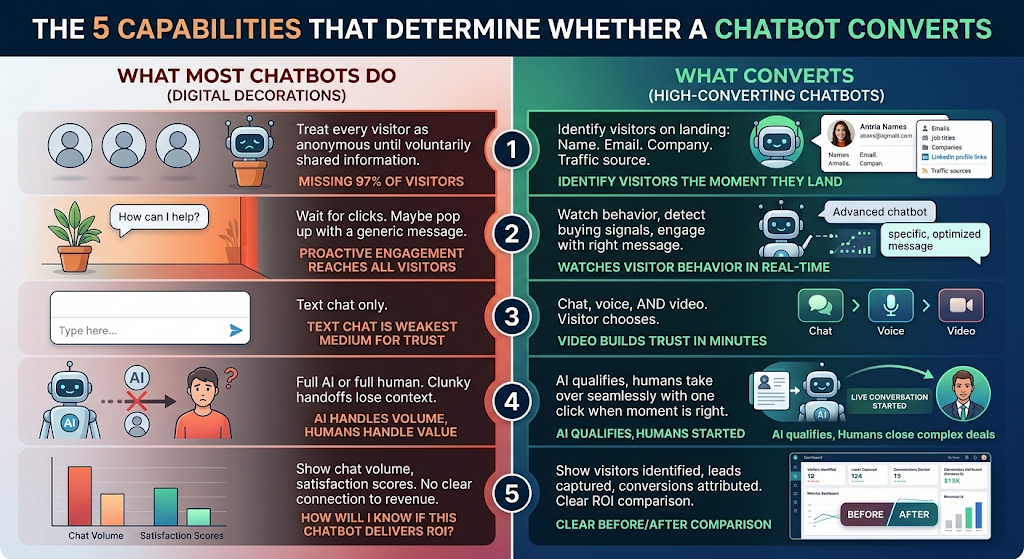
After testing dozens of platforms, I’ve identified exactly five things that separate high-converting chatbots from digital decorations:
1. Visitor Identification
What many chatbots do: Treat visitors as anonymous until they voluntarily share information.
What to look for: The ability to identify available visitor information such as name, email, company, job title, social profiles, and traffic source.
Why this matters: Visitors don’t always voluntarily provide their information. Visitor identification can give sales teams additional information about website traffic and potential prospects.
The question to ask: Does this chatbot tell me WHO is on my website, or just THAT someone is there?
2. Proactive Engagement
What many chatbots do: Sit in the corner. Wait for clicks. Maybe pop up with a generic “How can I help?”
What to look for: Watch visitor behavior in real-time, detect relevant behavioral signals, and engage visitors based on those signals.
Why this matters: Not every visitor will click a chat widget. Proactive engagement gives businesses another way to start conversations with visitors.
The question to ask: Does this chatbot reach out to visitors, or only respond when they reach out first?
3. Multi-Channel Communication
What many chatbots do: Focus primarily on text chat.
What to look for: Chat, voice, and video options that allow visitors to choose how they want to communicate.
Why this matters: Text chat works well for many questions, while voice and video can provide more direct human interaction when a conversation requires it.
The question to ask: Can visitors talk to us and see us, or only type to us?
4. Human Takeover
What many chatbots do: Rely heavily on either automated or human conversations, with different approaches to handoffs.
What to look for: AI can engage and qualify visitors while giving humans the ability to join a conversation when needed.
Why this matters: AI can support initial engagement and qualification, while human team members can step in when a conversation requires their expertise.
The question to ask: Can I take over an AI conversation when I see a promising lead?
5. Measurable ROI
What most chatbots do: Show chat volume. Maybe satisfaction scores. No clear connection to revenue.
What converts: Show visitors identified, leads captured, conversations started, conversions attributed. Clear before/after comparison.
Why this matters: If you can’t prove your chatbot is generating more revenue than it costs, you’re just paying for software.
The question to ask: How will I know if this chatbot is delivering ROI?
The Chatbot Hierarchy: 5 Levels of Website AI
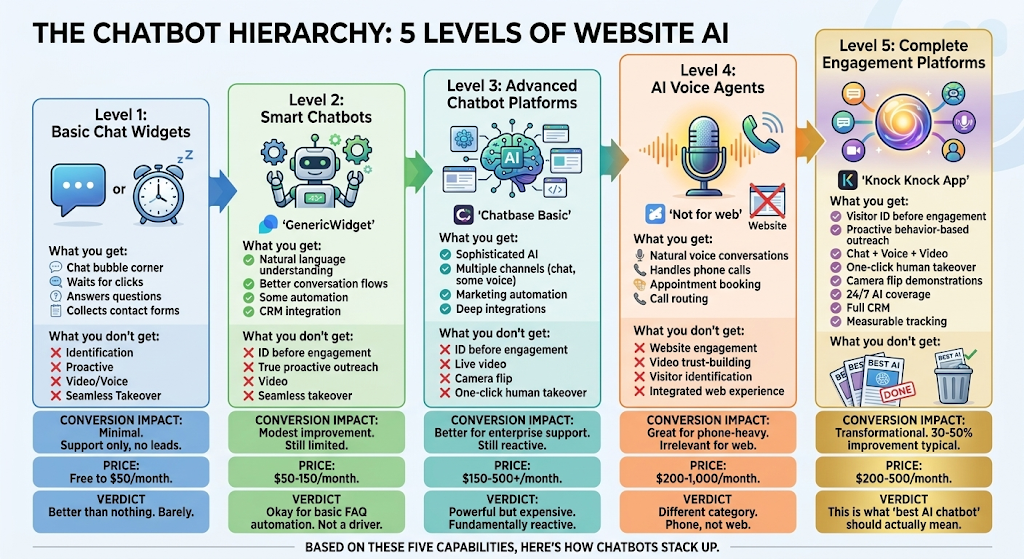
Based on these five capabilities, here’s one way to think about different types of chatbot and engagement platforms:
Level 1: Basic Chat Widgets
Examples: Basic live-chat and chat-widget solutions
What you may get:
- Chat bubble in the corner
- Visitor-initiated conversations
- Answers to common questions
- Contact collection through forms
These tools can be useful when your primary goal is straightforward website chat or support.
Level 2: Smart Chatbots
Examples: AI-powered chat and automation platforms
What you may get:
- Natural language conversations
- More advanced conversation flows
- Automation
- Integrations with other business tools
These platforms can be useful for FAQ automation, customer support, and other automated conversations.
Level 3: Advanced Chatbot Platforms
What you may get:
- More sophisticated AI capabilities
- Multiple communication options
- Marketing and support automation
- Deeper integrations
These platforms are often designed for businesses that need broader customer communication and support functionality.
Level 4: AI Voice Agents
Examples: AI voice-agent platforms
What you may get:
- AI-powered voice conversations
- Phone-call handling
- Appointment booking
- Call routing
These tools address voice and phone use cases and may serve a different purpose from website-focused engagement platforms.
Level 5: Complete Engagement Platforms
EExample: Knock Knock App
What you get:
- Visitor identification
- Proactive engagement based on behavior
- Chat + voice + video
- Human takeover
- Camera flip for demonstrations
- AI-powered coverage
- CRM integration
- Conversion tracking
This category brings multiple visitor engagement capabilities together in one platform
Why Most Chatbots Are Stuck at Level 2
Here’s the uncomfortable truth about the chatbot industry:
Most platforms were built for support, not sales.
They were designed to deflect tickets. Answer FAQs. Reduce support costs. Handle volume.
Converting visitors into customers? That was an afterthought, if it was a thought at all.
That’s why they’re reactive. That’s why they’re text-only. That’s why they can’t identify visitors proactively. That’s why human handoffs are clunky.
They solve the support problem. They don’t solve the conversion problem.
And if you’re looking for the “best AI chatbot for website,” you probably want conversions, not just support.
The Real Comparison: What Actually Matters
Forget features. Here’s how the real contenders stack up on what matters:
| Capability | Tidio | Intercom | Drift | Zendesk | Knock Knock App |
| Visitor ID before engagement | ❌ | ❌ | Partial | ❌ | ✅ Full |
| Proactive behavior-based engagement | Basic | Basic | Good | Basic | ✅ Advanced |
| Live video | ❌ | ❌ | ❌ | ❌ | ✅ |
| Voice calls | ❌ | Limited | Limited | Via integration | ✅ Native |
| One-click human takeover | Clunky | Better | Good | Clunky | ✅ Seamless |
| Camera flip | ❌ | ❌ | ❌ | ❌ | ✅ |
| GoHighLevel integration | Zapier | Zapier | Zapier | Zapier | ✅ Native |
| HubSpot integration | ✅ | ✅ | ✅ | ✅ | ✅ Native |
| Conversion tracking | Basic | Good | Good | Basic | ✅ Advanced |
| Price | $29-59 | $74-150+ | $2,500+ | $55-150+ | $200-500 |
The pattern is clear:
Most chatbots check some boxes. None of them check all the boxes that actually drive conversions.
Except one.
Why Knock Knock App Is the Best AI Chatbot for Website in 2026
Knock Knock App combines AI-powered engagement with visitor intelligence and human communication tools.
Here’s how:
It Identifies Visitors Before They Engage
Knock Knock App is designed to provide available visitor information such as:
- Name
- Email address
- Company and job title
- Social profile information
- Traffic source
- Behavior data
This information can help sales teams better understand who’s visiting and which visitors may deserve attention.
Visitor intelligence can help teams identify decision-makers and buying-intent signals.
It Engages Proactively Based on Behavior
AI watches every visitor in real-time:
AI can use visitor activity and behavioral signals such as:
- Pages visited
- Time spent
- Return visits
- Other available engagement signals
When behavior indicates potential interest, AI can initiate a relevant conversation.
Pricing page visitor: “Comparing plans? I can explain which one fits your situation.”
Return visitor: “Welcome back. Ready to continue where you left off?”
Multiple page views: “You’ve been exploring for a few minutes. Want me to point you to what you’re looking for?”
This gives businesses another way to engage visitors instead of relying entirely on visitors to initiate conversations.
It Does Chat, Voice, AND Video
Visitors can choose how to connect:
- Text chat for quick questions
- Voice for detailed conversations
- Live video for face-to-face communication
Video can be useful when a prospect wants a more direct conversation or when a product or service benefits from a visual explanation.
Visitors can connect directly from the website without requiring a separate meeting link.
Human Takeover Actually Works
Watch AI conversations in real-time from your dashboard or mobile app.
See a hot lead? A decision-maker from a target company? Someone ready to buy?
One click. You’re in the conversation. Video, voice, or chat.
The visitor doesn’t feel transferred. They feel like they got instant AI help and then connected with exactly the right person.
AI qualifies. You close. Seamless.
Camera Flip Changes Everything for Visual Businesses
Mid-video-call, flip to your rear camera.
Now you’re showing:
- Products in hand
- Properties in person
- Facilities in real-time
- Equipment in action
- Work in progress
This is live demonstration. Immediate. Personal. No chatbot anywhere else can do this.
Real estate agents walk through properties. Home services show past work. Retailers demonstrate products. Car dealers tour the lot.
It’s a conversion weapon.
Native CRM Integration
Knock Knock App supports CRM and workflow integrations, allowing relevant visitor and conversation information to flow into connected systems.
Depending on the integration and configuration, this can include:
- Contact information
- Conversation history
- Pages viewed
- Intent information
- Traffic source
- Tags
This can reduce manual data entry and provide additional context for follow-up.
24/7 That Doesn’t Suck
AI never sleeps. But unlike most chatbots, this one doesn’t frustrate after-hours visitors.
The prospect browsing at 11pm? Engaged instantly. Qualified. Captured with full context.
If you’re available via mobile app, AI can connect them to you live. If not, perfect follow-up is queued for morning.
No leads lost to timing.
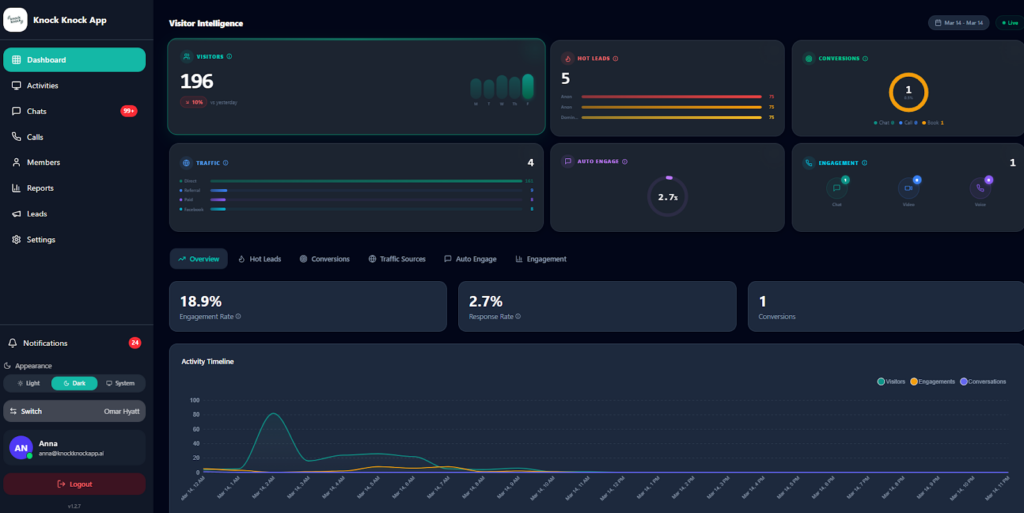
Measurable Results
Dashboard shows exactly what’s happening:
- Visitors identified
- Conversations started
- Leads captured
- Conversions attributed
- Clear ROI calculation
You don’t wonder if it’s working. You know. You prove it. You optimize based on data.
The Results You Should Actually Expect
Let’s be realistic about outcomes:
Week 1:
- Widget is live, AI is engaging
- Visitors are being identified based on available data
- First proactive conversations happening
- You’re learning the system
Week 2-4:
- Proactive engagement refined
- Human Takeover is being integrated into your workflow
- Lead and engagement activity can be monitored
- Conversion performance can be compared with your previous results
Month 2-3:
- Engagement and conversion data can be evaluated
- System can be further optimized based on performance
- ROI can be measured
- You can determine how the platform fits into your sales process
Results will vary based on your website traffic, audience, offer, configuration, and sales process.
Who Should Use Knock Knock App
Not everyone. Be honest about fit:
Potentially useful for:
- Businesses paying for traffic who want better conversion
- High-ticket services where trust matters before purchase
- Competitive markets where fast lead response matters
- B2B companies who want more information about who’s visiting
- Agencies wanting to offer AI engagement to clients
- Businesses that want measurable engagement and conversion data
May not be right for:
- You just want the cheapest chat widget possible
- You have very little website traffic
- You have zero interest in video or voice
- You want full automation with zero human involvement
- You don’t want to spend time optimizing your setup
If the first list describes your needs, Knock Knock App may be worth considering.
The Bottom Line
Many “best AI chatbot” lists focus primarily on feature comparisons.
Here’s what you actually need to know:
Different chatbot categories solve different problems. Basic chat widgets can support simple conversations. AI chatbots can automate FAQs and support. Voice agents focus on phone conversations. More complete engagement platforms bring multiple capabilities together.
For businesses focused on website conversion, consider visitor identification, proactive engagement, multiple communication channels, human takeover, and measurable results.
Knock Knock App brings these capabilities together in one platform.
It can help identify visitors, engage based on behavior, provide chat, voice, and video options, support human takeover, and track engagement and conversion activity.
That’s the approach Knock Knock App takes to website AI.
Frequently Asked Questions
What makes Knock Knock App the best AI chatbot for websites in 2026? Knock Knock App brings together five conversion-focused capabilities: visitor identification before engagement, proactive behavior-based outreach, multi-channel communication (chat + voice + video), human takeover, and measurable conversion tracking.
How is visitor identification different from collecting contact info? Traditional chatbots typically collect contact information when visitors voluntarily provide it. Knock Knock App can use available data signals to help identify visitor information such as name, email, company, job title, social profiles, and traffic source, including in some cases visitors who haven’t filled out a form or started a chat.
Why does video matter in an AI chatbot?Video gives visitors another way to communicate directly with your team. For products or services where visual demonstrations or human interaction are valuable, live video can provide a more personal experience than text chat alone.
How does Human Takeover work? ou can monitor AI conversations and step in when human involvement is appropriate. When you see a promising lead or a conversation that requires human expertise, your team can join through the available video, voice, or chat options.
What’s camera flip? During supported video calls, you can switch cameras to show products, properties, facilities, or work in real-time. This can be useful for businesses such as real estate, retail, home services, and other industries where visual demonstrations are helpful.
What CRMs does Knock Knock App integrate with? Native integration with GoHighLevel and HubSpot. Zapier integration for everything else (Salesforce, Pipedrive, etc.). Full context flows automatically: contact info, conversation history, pages viewed, intent score, traffic source.
How much does Knock Knock App cost compared to other chatbots? Pricing and features can vary by plan and may change over time. Compare the current Knock Knock App plans with other platforms based on the capabilities your business needs. making it pay for itself within 60 days should only be used as a performance claim if you have evidence supporting that result.
How long does it take to set up? Most businesses are fully live within 1-3 days. Widget installation takes 10 minutes. Configuration takes a few hours. CRM connection takes 30 minutes. You can go live the same day you start, with optimization happening over the following weeks.
What if I already have a chatbot? You can replace it or run both in parallel to compare results. Most businesses see the difference immediately when they realize they can now identify visitors who were previously invisible and engage proactively instead of waiting for clicks.
What results should I realistically expect? Results depend on factors such as your existing website traffic, audience, offer, configuration, and sales process. Measure performance against your existing baseline to determine the impact on engagement, leads, and conversions.
Ready to use an AI chatbot that actually converts?👉 Try Knock Knock App: knockknockapp.ai

Anna Hyatt
Co-Founder | Knock Knock App
AI × Human Touch = Happier Clients, More Revenue
LinkedIn Profile