The Difference Between Helpful and Annoying
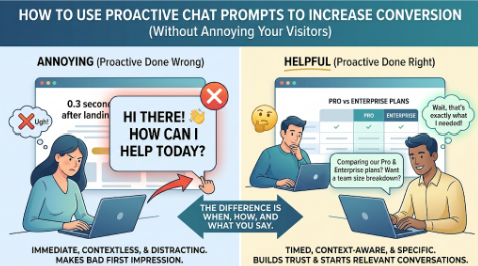
You land on a website.
0.3 seconds later: “HI THERE! 👋 HOW CAN I HELP YOU TODAY?”
You haven’t even read the headline yet. You don’t know what the company does. You definitely don’t have a question.
You close the chat. You’re annoyed. The company just made a bad first impression.
That’s proactive chat done wrong.
Now imagine this instead.
You land on a website. You browse. You read the features page. You check the pricing. You scroll back up. You’re clearly comparing options.
Then, a message appears:
“I noticed you’re comparing our Pro and Enterprise plans. Want me to break down which one makes sense for a team your size?”
You pause. That’s… actually helpful. That’s the exact question you had.
You respond. Conversation starts.
That’s proactive chat done right.
The difference isn’t whether you reach out. It’s when, how, and what you say.
Why Proactive Beats Reactive
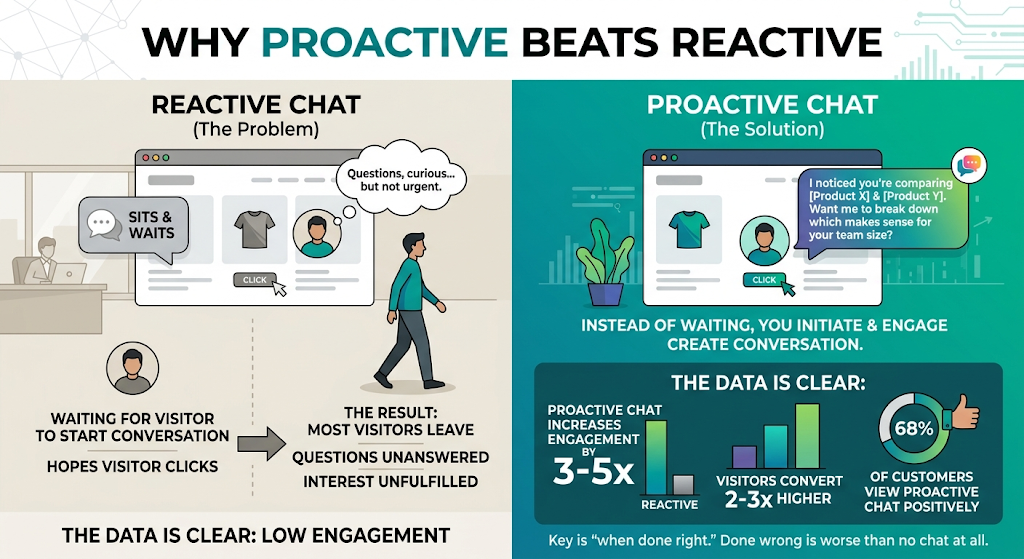
Most live chat is reactive. It sits there. Waits for the visitor to start the conversation. Hopes someone clicks.
Here’s the problem: many visitors don’t click.
They may have questions, but not urgent enough to type. They’re curious, but not committed enough to engage. They’re interested, but not ready to ask for help.
So they may leave with their questions unanswered.
Proactive chat changes the equation.
Instead of always waiting, you can initiate. Instead of relying exclusively on visitors to start the conversation, you can create an opportunity to engage.
The important part is relevance.
Proactive chat can create more opportunities for engagement when messages are timely, contextual, and genuinely useful.
The key is “when done right.” Because proactive chat done wrong can easily become intrusive.
The Three Sins of Proactive Chat
Before I show you what works, let me show you what fails.
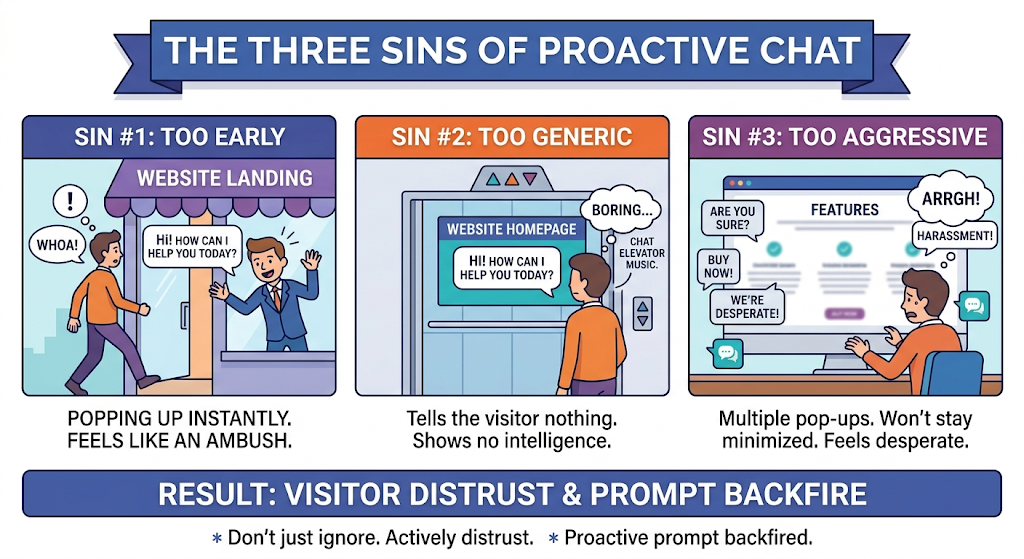
Sin #1: Too Early
Popping up the instant someone lands. They haven’t oriented themselves. They don’t know what they’re looking at. They may not have a question yet.
This can feel like walking into a store and being approached by a salesperson before you’ve had a chance to look around.
Sin #2: Too Generic
“Hi! How can I help you today?”
This message tells the visitor very little. It doesn’t demonstrate useful context or show that the conversation is relevant to what they’re doing.
Sin #3: Too Aggressive
Multiple pop-ups. Chat that won’t stay minimized. Messages that keep appearing even after they’ve been dismissed. Exit-intent prompts that feel desperate.
This isn’t helpful engagement. It’s intrusive.
The result of all three sins: Visitors may ignore the chat, dismiss it, or develop a negative impression of the experience.
The Science of Timing
When should you reach out?
Not necessarily when they land. Not automatically after 5 seconds. Not based only on an arbitrary timer.
Reach out when behavior provides useful signals of intent.
Here’s what that can look like:
| Behavior | What It May Mean | When You Could Engage |
|---|---|---|
| Viewed pricing page | Evaluating options | After meaningful engagement with pricing |
| Returned visitor | Interested enough to come back | After additional browsing |
| Long time on page | Reading carefully or considering details | After meaningful time on the page |
| Scrolling back up | Comparing or re-reading information | After repeated engagement |
| Viewed case studies | Looking for evidence or examples | After engaging with relevant case studies |
| Exit intent | May be preparing to leave | Before departure, without blocking the experience |
The right time isn’t always a clock. It can be a combination of signals.
Someone on their first visit, homepage, 10 seconds in? Probably too early.
Someone returning to the site, spending meaningful time on pricing, and comparing different options? That may be a better moment.
The Anatomy of a Perfect Proactive Prompt
A useful proactive message has four elements:
1. Recognition
Show that the message is relevant to the visitor’s experience.
- Use their name if it is legitimately available and appropriate to use
- Reference their company where appropriate and supported
- Acknowledge relevant behavior if nothing else
2. Context
Reference what they’re actually doing.
- “I noticed you’re looking at…”
- “I see you’re comparing…”
- “Looks like you’re interested in…”
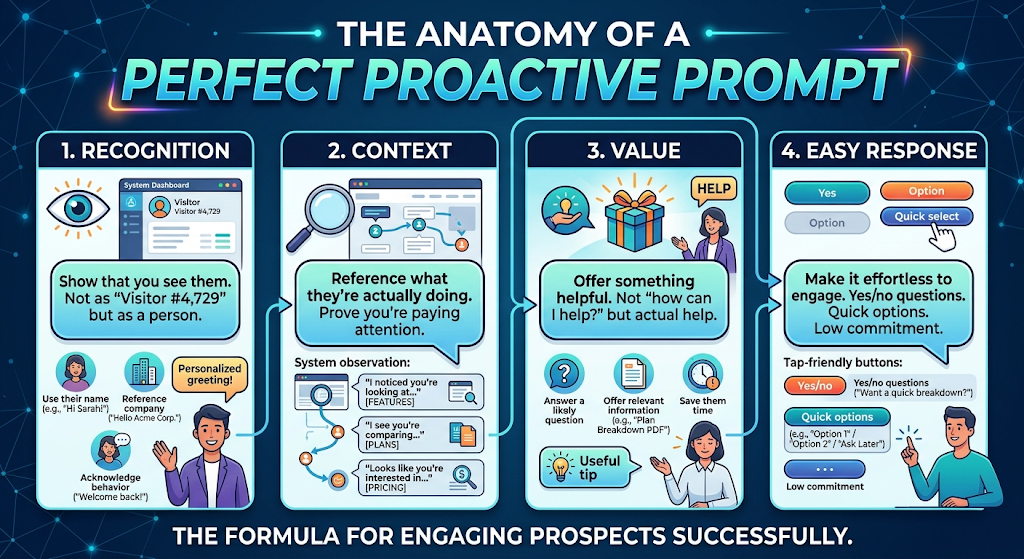
33. Value
Offer something helpful. Not simply “how can I help?” but actual assistance.
- Answer a likely question
- Offer relevant information
- Save them time
4. Easy Response
Make it effortless to engage. Yes/no questions. Quick options. Low commitment.
10 Proactive Prompts That Actually Convert
Let me give you specific examples you can adapt.
For Pricing Page Visitors
Generic (Don’t): “Hi! Let me know if you have any questions about pricing!”
Proactive (Do): “I see you’re comparing our plans. Most [industry] companies your size start with Pro. Want me to show you why?”
Why it works: Specific. Offers guidance. Easy to respond to.
For Return Visitors
Generic (Don’t): “Welcome back! How can I help?”
Proactive (Do): “Hey [Name], good to see you back. Last time you were looking at [specific page]. Still have questions about that?”
Why it works: Uses available context and references previous activity.
For Case Study Readers
Generic (Don’t): “Want to learn more about our customers?”
Proactive (Do): “I see you’re reading about how [Company] got [result]. Want to explore what a similar approach could look like for [their company]?”
Why it works: References relevant content and creates a natural next step without assuming the same result will apply to every company.
For Long Time on Page
Generic (Don’t): “Having trouble finding something?”
Proactive (Do): “You’ve been on this page a while — totally get it, there’s a lot here. What’s the one thing you’re trying to figure out?”
Why it works: Acknowledges their experience and asks a focused question.
For Feature Page Browsers
Generic (Don’t): “Questions about our features?”
Proactive (Do): “I noticed you’re looking at [specific feature]. That’s something businesses can use to address [specific problem]. Is that what you’re dealing with too?”
Why it works: Connects a specific feature to a relevant problem without relying on unsupported customer claims.
For Integration Page Visitors
Generic (Don’t): “We integrate with lots of tools!”
Proactive (Do): “Looking for something specific? Tell me what you’re running and I’ll help you check whether we integrate with it.”
Why it works: Offers immediate value and removes friction.
For Demo Page Visitors
Generic (Don’t): “Ready to book a demo?”
Proactive (Do): “Have a question before booking a demo? Ask me now, and then you can decide whether a demo makes sense.”
Why it works: Lowers commitment and offers value before asking for the booking.
For Comparison Page Visitors
Generic (Don’t): “Better than the competition!”
Proactive (Do): “Comparing us to [competitor]? I can walk you through the differences so you can see which option fits your requirements.”
Why it works: Useful and neutral rather than making an unsupported superiority claim.
For Exit Intent
Generic (Don’t): “Wait! Don’t leave! Here’s 10% off!”
Proactive (Do): “Looks like you’re heading out. Before you go — was there something you were hoping to find but couldn’t? I might be able to help.”
Why it works: Offers help without unnecessary pressure.
For High-Value Identified Visitors
Generic (Don’t): “Hi! Thanks for visiting!”
Proactive (Do): “Hi [Name]. I see [Company Name] is looking at [solution category]. Would a relevant example or case study be helpful?”
Why it works: Uses available context and offers specific value.
The Escalation Ladder
Not every proactive prompt should be the same intensity.
Think of it as a ladder:
Rung 1: Soft Touch
Low commitment. Just starting conversation.
“Have a quick question? I’m here.”
Rung 2: Helpful Offer
Specific value. Shows context.
“I noticed you’re comparing plans. Want me to break down the differences?”
Rung 3: Direct Engagement
Clear offer based on stronger intent signals.
“Based on what you’re looking at, a quick conversation with our team might help. They’re available now.”
Rung 4: Video Offer
Higher commitment.
“Want to hop on a quick video call? I can show you how this could work for your situation.”
Match the rung to the intent signal. Lower intent? Soft touch. Stronger intent? Consider a more direct offer.
The Context Advantage
Here’s what separates basic proactive chat from a more contextual approach.
Basic: Timing-based triggers
“After 30 seconds on pricing page, show message”
More contextual:
“When a returning visitor from an identified company spends meaningful time on the pricing page and has also viewed relevant case studies during the session, show a personalized message based on the available context.”
More context can help make the prompt more relevant.
Instead of relying exclusively on timers, contextual engagement can combine visitor information, behavior, intent signals, and the content someone is currently viewing.
What Knock Knock Does Differently
Many chat tools offer proactive messaging capabilities. The exact triggers, AI features, visitor intelligence, and engagement options vary by platform.
Knock Knock combines several layers:
Visitor Identification Know who they are before they click, where supported. Available information can include visitor or company data depending on identification coverage, geography, data availability, consent, and privacy settings.
Behavior Tracking See supported website activity, including pages and engagement signals. Every scroll. Every click. Time on each section can provide additional context for engagement where those capabilities are enabled.
Intent Scoring Automatic scoring based on configured signals. High-intent visitors get different treatment than browsers.
Contextual AI The AI crafts messages based on context, allowing engagement to reflect available visitor and behavioral information rather than relying exclusively on generic messages.
Human Handoff When proactive chat creates a conversation that benefits from human involvement, one click takes you to live video. This creates an opportunity to continue the conversation face-to-face while the visitor is still engaged.
That’s the approach: Identify → Track → Score → Engage → Connect.
Proactive prompts are one piece. But they’re often the piece that starts the conversation.
The Results
When evaluating proactive chat, avoid assuming a fixed improvement will apply to every website.
Instead, compare performance against your own reactive-chat baseline:
| Metric | What to Measure |
|---|---|
| Engagement rate | Percentage of visitors who engage with proactive prompts |
| Conversation start rate | Percentage of targeted visitors who begin a conversation |
| Lead qualification rate | Percentage of conversations that become qualified opportunities |
| Conversion rate | Percentage of engaged visitors who complete your desired outcome |
| Customer experience | Dismissals, responses, feedback, and other experience signals |
Same traffic. Same website. Different engagement approach.
The visitors were already there. Proactive chat gives you another opportunity to start conversations that reactive chat may miss.
Start Here
You don’t need to rebuild everything.
Week 1: Identify your highest-intent pages, such as pricing, demo, or comparison pages. Set up contextual proactive prompts for those pages.
Week 2: Add behavior triggers. Time on page. Scroll depth. Return visits. Layer relevant signals into your prompts.
Week 3: Analyze what’s working. Keep stronger-performing prompts and revise or remove prompts that visitors consistently ignore or dismiss.
Week 4+: Add visitor identification where appropriate. Personalize prompts using available visitor or company information and continue measuring performance.
Small steps. Measure the results. Improve from there.
See It In Action
We’re running a free webinar where we show proactive chat in action.
You’ll see:
- How to identify visitors before they engage
- How behavior triggers work in real-time
- How contextual prompts convert compared to generic
- How one-click video takes conversations to the next level
[Register for the Free Webinar →]
Your visitors are ready. The question is whether you’re reaching out at the right moment with the right message.
Written by Anna Hyatt, Co-Founder of Knock Knock App.
Frequently Asked Questions
Won’t proactive chat annoy visitors? It can if it’s too early, too generic, too frequent, or difficult to dismiss. Contextual prompts triggered by meaningful behavior can create a more relevant experience, but businesses should test timing, frequency, messaging, and dismissal rates with their own audience.
How do I know when to trigger a proactive message? Look at behavior signals rather than relying exclusively on timers. Pricing-page activity, return visits, meaningful time on page, scroll patterns, relevant content views, and exit intent can all provide useful context. Combining signals can help you make timing more relevant.
What if my team can’t respond to every proactive conversation? AI can support conversations based on how your system is configured, including answering supported questions and gathering qualification information. Your team can then step in when human involvement is useful, such as for complex questions or high-intent opportunities.
How personalized do the prompts need to be? Use enough personalization to make the message genuinely relevant without making assumptions or creating an intrusive experience. Where appropriate and legitimately available, that might include a name, company, current page, previous visit, or other relevant context.
What’s the biggest mistake people make with proactive chat? Going too early with generic messages. If your prompt could appear unchanged on almost any website, it probably isn’t using enough context. Focus on what the visitor is looking at and the relevant signals they’ve provided.
How quickly will I see results? There is no universal timeline. Engagement changes may become visible relatively quickly if you have sufficient traffic, while meaningful conversion analysis usually requires enough interactions to compare results reliably. Measure your own baseline and evaluate performance as you refine triggers and prompts.
Can I use proactive chat on mobile visitors? Yes, where your chat experience supports mobile devices. The same principles apply, but screen space matters. Keep prompts concise, relevant, and easy to dismiss.

Anna Hyatt
Co-Founder | Knock Knock App
AI × Human Touch = Happier Clients, More Revenue
LinkedIn Profile


