The Visitors You Can’t See Are Costing You Deals
Right now, someone could be on your website.
They’re browsing your features page. They’ve looked at pricing. They came from a search related to what you sell.
They may be a potential customer, but you have no idea who they are.
If they leave without filling out a form, starting a chat, requesting a demo, or otherwise identifying themselves, your sales team may never know they visited.
That’s the problem B2B visitor identification software is designed to address.
Selling outside a strict B2B motion, or want the full field compared side by side? See our roundup of the best overall visitor identification tools.
Visitor identification platforms use different types of data and matching techniques to provide additional information about website traffic. Depending on the platform and available data, this can range from company-level information to individual business contact details.
But not all visitor identification tools work in the same way. Some focus on company identification, while others provide contact-level information, behavioral context, intent signals, or real-time engagement capabilities.
This guide breaks down what to look for, what separates different approaches, and how to evaluate visitor identification software for your business.
What Is B2B Visitor Identification Software?
Let’s start with the basics.
B2B visitor identification software unmasks anonymous website visitors by attempting to connect website activity with available company or professional information. The exact information available depends on the technology, data sources, visitor, consent requirements, and platform.
How does it work?
Different tools may use a combination of:
- IP address matching – Connecting network information to known businesses
- First-party data – Recognizing known or returning visitors where appropriate
- Data enrichment – Adding business information to available visitor data
- Reverse DNS lookup – Identifying organizational networks
- Device or browser signals – Depending on the technology and applicable privacy requirements
- Integration with B2B databases – Connecting available information with business datasets

The exact identification methods vary considerably between providers. Businesses should understand what data a provider uses, where it comes from, how accurate it is, and what privacy or consent requirements apply.
Why B2B Companies Need Visitor Identification
Most websites receive visitors who never submit a form, request a demo, or initiate a conversation.
That doesn’t necessarily mean those visitors have no commercial intent. Some may be researching your category, evaluating competitors, reviewing pricing, reading case studies, or returning multiple times before they’re ready to speak with someone.
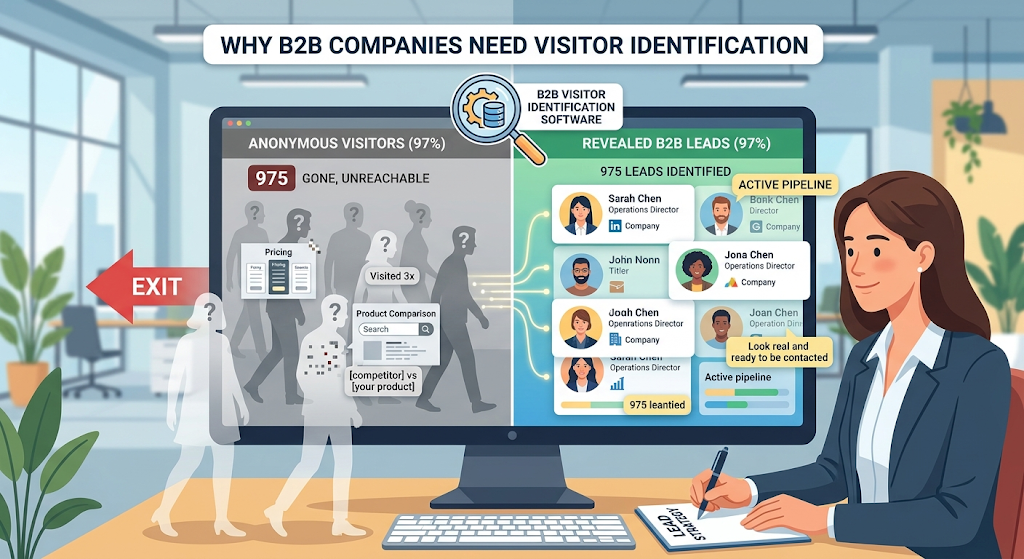
They may not convert during a particular visit because:
- They aren’t ready to talk yet
- They don’t want to fill out a form
- They want to continue researching
- They become distracted
- The website asks for more information than they’re ready to provide
Visitor identification can provide additional context around some of this otherwise anonymous website activity. Depending on the platform, sales and marketing teams may be able to identify relevant companies or contacts and understand how they are interacting with the website.hem.
The Two Types of Visitor Identification
Not all identification is equal. There are two broad levels to understand.
Level 1: Company Identification
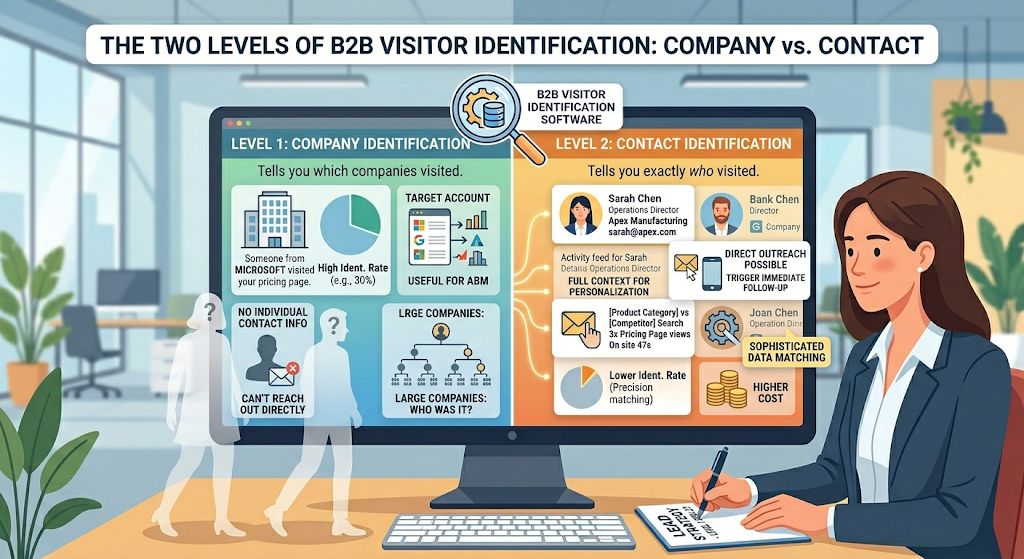
Company-level identification attempts to determine which organization a website visitor is associated with.
For example, instead of seeing only an anonymous visit, the platform may indicate that someone associated with a particular organization visited a product or pricing page.
Pros:
- Useful for account-based marketing
- Helps monitor engagement from target accounts
- Can provide additional company-level context
Cons:
- Does not necessarily identify the individual visitor
- Direct personal outreach may not be possible
- Large organizations may have many potential contacts
Level 2: Contact Identification
Contact-level identification attempts to associate a visit with an individual business contact. Depending on the platform and available data, information may include a name, business email, job title, LinkedIn profile, or other professional details.
Pros:
- Can provide more specific context
- May support more personalized follow-up
- Helps teams understand which types of contacts are engaging
- Can support sales prioritization
Cons:
- Identification availability varies
- Data accuracy needs to be evaluated
- Privacy and compliance considerations are important
- Contact-level data may cost more than company-level identification
Some platforms provide both company-level and contact-level information where data is available.ilable.
What to Look for in Visitor Identification Software
Here’s your evaluation checklist.
1. Identification Rate
Identification rate is an important metric, but there is no universal percentage that defines a poor, average, good, or excellent platform.
Identification performance can vary according to traffic composition, geography, device type, data availability, audience, identification methodology, and whether the platform is identifying companies or individuals.
Ask providers how they calculate their identification rate. Then run a trial using your actual website traffic and measure the results yourself.
2. Data Depth
What information do you get for each identified visitor?
Basic information may include:
- Company name
- Industry
- Company size
More detailed information may include:
- Contact name
- Job title
- Business email
- Professional profile information
Additional context may include:
- Phone number where available
- Pages viewed
- Time spent
- Intent signals
- Traffic source
- Return-visit information
More data is not automatically better. Accuracy, relevance, privacy, and how effectively your team can use the information are equally important.
3. Real-Time vs. Batch
When do you receive the information?
Batch processing provides visitor information after the activity has occurred.
Real-time identification can make information available while or shortly after someone is browsing, depending on the platform.
For sales teams that prioritize rapid engagement, real-time information can be useful because it can reduce the delay between website activity and an appropriate response.
4. Integration Capabilities
Where does the data go?
Consider integrations such as:
- CRM platforms
- Marketing automation
- Slack or Teams
- Email notifications
- APIs
- Workflow automation
The right integrations can reduce manual work and help visitor information become part of the team’s existing workflow.
5. Compliance and Privacy
This matters more than ever.
When evaluating a provider, review:
- GDPR considerations
- CCPA considerations
- Privacy documentation
- Consent mechanisms where required
- Data sources
- Data retention
- Opt-out processes
- Data handling transparency
Do not assume that using publicly available B2B information automatically makes every use of visitor identification compliant. Requirements can vary by jurisdiction, technology, data type, and how the information is subsequently used.
Businesses should evaluate the provider’s documentation and obtain appropriate legal or privacy guidance where necessary.
6. Beyond Identification: What Else?
Some tools focus primarily on identification. Others combine identification with additional capabilities such as:
- Behavior tracking – Understanding website activity
- Intent scoring – Prioritizing potentially relevant visitors
- Engagement tools – Chat, voice, video, or AI engagement
- Analytics – Understanding website and engagement patterns
Whether you need a specialized identification tool or a broader platform depends on your existing technology stack and sales workflow.
The Problem With Most Visitor Identification Tools
Visitor identification data is only useful when your team can turn it into appropriate action.
Problem 1: Identification Without Action
A visitor identification platform may tell you which company or contact visited. Your team may then need to research the account, update the CRM, determine whether outreach is appropriate, and decide on the next step.
When those activities are manual, the process can become slow.
Identification is most useful when it connects naturally with the next step in your sales workflow.
Problem 2: Company-Only Limitations
Company-level identification can be valuable for account-based marketing, but it does not necessarily tell you which individual visited.
If a company has hundreds or thousands of employees, sales teams still need additional context before deciding who, if anyone, should receive outreach.
Problem 3: No Behavior Context
Knowing that a company or contact visited can be useful. Understanding what happened during the visit provides additional context.
Which pages did they view? Did they return? What content attracted their attention? Which campaign or source brought them to the site?
Behavioral context can help teams interpret visitor information more effectively.
Problem 4: Delayed Data
Delayed reporting may be sufficient for analytics and account-level research. For teams that want to engage visitors while interest is active, real-time information can be more useful.
The appropriate approach depends on your sales process. Not every visitor requires immediate outreach.
Problem 5: Yet Another Tool
Sales and marketing teams often already use multiple platforms. Adding another standalone system can increase complexity if information needs to be manually moved between tools.
When evaluating a solution, consider whether it integrates effectively with your current technology stack or whether a more unified platform would simplify the workflow.
What the Best Visitor Identification Software Actually Does
A useful visitor identification solution should do more than produce a list of names. It should provide accurate, relevant information that fits into a practical workflow.
Identifies AND Engages
For businesses that want real-time website engagement, connecting identification with communication can reduce the delay between recognizing potential interest and starting an appropriate conversation.
As we explored in The Leaky Bucket Problem, many website visitors leave without completing a conversion action. Identification and engagement technologies can give businesses additional opportunities to understand and respond to relevant website activity.
Provides Full Behavior Context
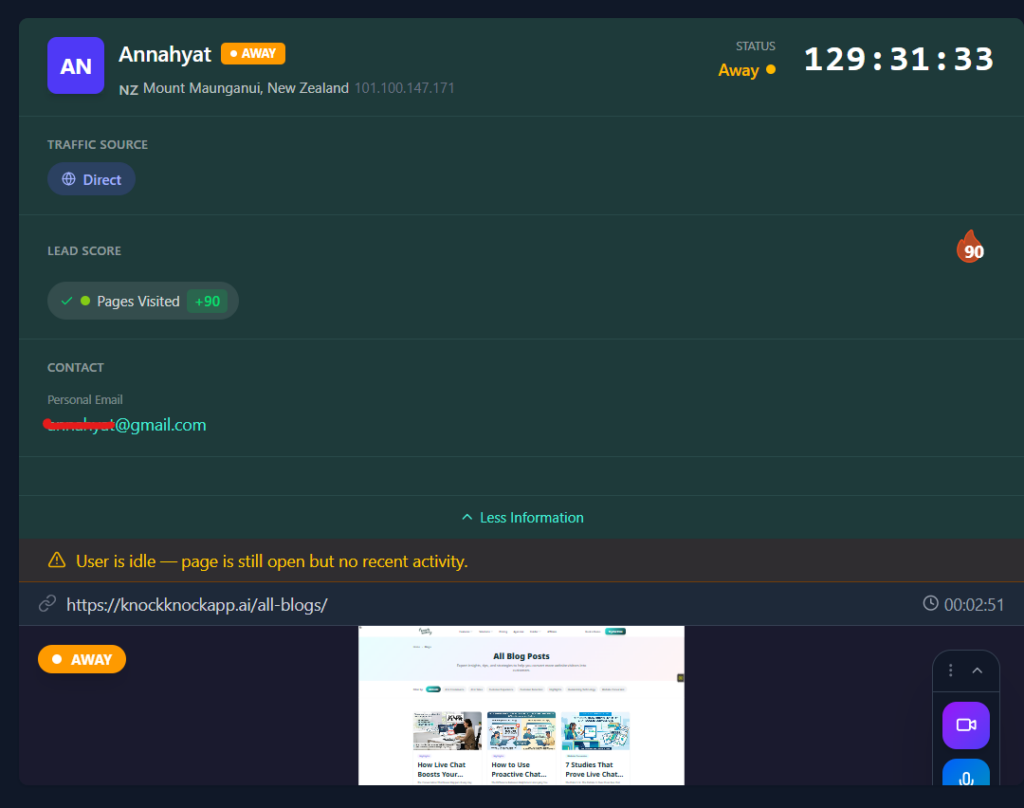
Behavioral information can include pages viewed, time spent, return visits, clicks, traffic source, and other website activity supported by the platform.
When teams have both identification and behavioral context, they can make more informed decisions about prioritization and engagement.
Scores Intent Automatically
Not all visitors demonstrate the same level of interest.
The tool should automatically score intent based on behavior signals where supported, helping teams prioritize website activity according to the criteria that matter to their business.
Intent scores should be treated as signals rather than guarantees that a visitor is ready to purchase.
Enables Immediate Connection
For some sales models, being able to communicate with an interested visitor while they’re still browsing can be valuable.
Chat, voice, or video can provide different ways to continue the conversation depending on visitor preference and team availability.
Integrates Seamlessly
Data flows automatically to your CRM when the platform and integration are configured to support that workflow.
Good integrations can reduce manual exports, repetitive data entry, and unnecessary movement between systems.
Unifies Multiple Capabilities
Some organizations prefer specialized tools for each function. Others may benefit from combining capabilities such as:
- Visitor identification
- Live chat
- Video communication
- Behavior tracking
- Intent scoring
- Analytics
The right approach depends on whether your organization values specialization or consolidation and how well the platforms integrate with your existing systems.urce of truth.
Knock Knock: The Unified Approach to Visitor Identification
Full disclosure: we built Knock Knock to solve the problems we’ve been discussing. Let me explain why.
The Problem We Saw
Businesses can end up using multiple platforms across website analytics, visitor intelligence, chat, video, intent data, and CRM workflows.
When these systems operate separately, teams may need to move between dashboards and connect information across multiple tools.
Identification and engagement can become disconnected.
What We Built
Knock Knock brings visitor intelligence and website engagement capabilities into a single platform.
Depending on current features, configuration, data availability, and integrations, capabilities can include:
Visitor Identification
- Individual business contact information where available
- Real-time visitor intelligence
- Behavior context
Traffic Intelligence
- Traffic-source information
- Campaign tracking
- Return-visitor information
- Device and location context where available
Behavior Tracking
- Page views
- Time on page
- Relevant interaction data
- Session information where supported
Intent Scoring
- Behavior-based scoring
- High-intent alerts
- Sales prioritization
- Configurable scoring criteria where supported
AI Engagement
- Behavior-based engagement
- Contextual messaging
- Automated conversations
- After-hours AI availability where configured
Live Connection
- Video calls
- Voice and chat options
- Human takeover from AI conversations
- Additional communication capabilities where supported
CRM Integration
- Supported CRM and workflow integrations
- Lead or contact creation where configured
- Relevant conversation or visitor information syncing
The important distinction is that these capabilities can work within the same website engagement workflow rather than requiring visitor intelligence to remain separate from the conversation.
Why Unified Matters
When identification, engagement, and sales workflows are connected, several benefits become possible:
- Faster workflows. Teams can reduce the time between recognizing relevant website activity and taking an appropriate action.
- More context. Visitor and conversation information can help AI and human representatives better understand the interaction.
- Fewer manual handoffs. Integrations can reduce the need to move information manually between systems.
- Technology consolidation. Depending on an organization’s existing stack, combining capabilities may reduce the number of separate tools required.
We wrote about this extensively in AI Orchestration vs. Automation. The difference between having multiple disconnected tools and creating a coordinated workflow is an important consideration when evaluating website engagement technology.
How Knock Knock Compares
Here’s how the capabilities stack up:
| Capability | Basic ID Tools | Enterprise ID Tools | Knock Knock |
| Company identification | ✅ | ✅ | ✅ |
| Individual contact identification | ❌ | ✅ | ✅ |
| Real-time identification | Sometimes | ✅ | ✅ |
| Behavior tracking | ❌ | Limited | ✅ Full |
| Intent scoring | ❌ | ✅ | ✅ |
| AI engagement | ❌ | ❌ | ✅ |
| Live chat | ❌ | ❌ | ✅ |
| Live video | ❌ | ❌ | ✅ |
| Human takeover | ❌ | ❌ | ✅ |
| CRM integration | Limited | ✅ | ✅ |
| Unified platform | ❌ | ❌ | ✅ |
| Starting price | $100-200/mo | $500-2000/mo | $197/mo |
Most identification tools do one thing well. Knock Knock does six things in one platform.
The ROI of Visitor Identification
ROI should be calculated using your own traffic, sales process, conversion rates, deal value, implementation costs, and measured results.
For example, before implementation, establish baseline metrics such as:
- Monthly website traffic
- Current lead volume
- Website conversion rate
- Qualified opportunities
- Average deal value
- Sales-cycle length
- Response time
- Current software costs
After implementing visitor identification, measure changes in identified visitor activity, engagement, qualified conversations, opportunities, sales outcomes, and operational costs.
Avoid assuming that identifying a certain number of visitors will automatically produce a predetermined number of conversations, leads, deals, or revenue. Identification is one part of the sales process, and results depend on traffic quality, implementation, engagement strategy, offer, sales execution, and many other factors.
For the same reason, Knock Knock should not be presented as producing a guaranteed 30-500x ROI, 30-50% conversion increase, 3x faster speed to lead, 40% reduction in tool costs, or 90%+ visitor intelligence coverage without verifiable supporting evidence.
Measure the platform against your own baseline and calculate ROI using actual business outcomes.
Implementation: What to Expect
Getting started with visitor identification generally involves installing the relevant website technology, configuring the platform, connecting appropriate systems, and testing the implementation.
Installation
Follow the provider’s current installation instructions for your website platform. Depending on the website and solution, this may involve adding a script, using a supported plugin, or configuring an integration.
Configuration
Connect the systems you need, configure engagement rules, establish notifications, review privacy requirements, and customize relevant messaging.
Implementation time depends on your website, integrations, internal approval processes, and configuration complexity.
Initial Data Collection
Once properly installed and configured, begin reviewing the information generated by the platform. Confirm that tracking and identification are functioning as expected before using the data operationally.
Optimization
Review what is working. Adjust engagement rules, qualification criteria, scoring, messaging, and workflows using actual performance data.
Treat visitor identification as an ongoing sales and marketing capability rather than a one-time installation.
Choosing the Right Tool for Your Business
Here’s how to decide:
Choose a basic company identification tool if:
- You primarily need account-level information
- Account-based marketing is your main use case
- You already have processes for researching contacts
- You don’t require immediate website engagement
Choose an enterprise identification platform if:
- You need deeper company or contact information
- You have a larger sales or marketing operation
- Advanced integrations or intent data are important
- You have the budget and resources to manage a more complex platform
Consider Knock Knock if:
- You want visitor intelligence and engagement within the same workflow
- Real-time engagement is important to your sales process
- You want to consolidate website engagement capabilities
- AI-assisted conversations are relevant to your customer journey
- Live video or voice is useful for your sales process
Always confirm current capabilities and pricing directly before making a purchasing decision.
The Future of Visitor Identification
Visitor identification technology continues to evolve alongside AI, data infrastructure, privacy regulation, and customer expectations.
AI-Powered Engagement Becomes More Important
Identification by itself provides information. AI can potentially help organizations decide how and when that information should lead to action.
This may include using website context to initiate relevant conversations, prioritize visitors, assist sales teams, or route interactions to appropriate people.
Real-Time Becomes More Valuable
For sales processes where timing matters, real-time visitor information can create opportunities for faster engagement.
Tools that enable real-time identification and real-time response can be particularly relevant to organizations that want to interact with prospects while they are actively browsing.
Unified Platforms Continue to Develop
Some businesses prefer specialized tools, while others are moving toward platforms that combine multiple related capabilities.
Unified platforms can reduce tool switching and simplify workflows, although organizations should still evaluate the quality of each capability rather than assuming consolidation is always better.
Privacy-First Data Collection
Privacy and transparency will remain critical considerations.
Businesses should understand where visitor information comes from, what legal basis applies to its collection and use, how consent is handled where necessary, and how individuals can exercise applicable privacy rights.
Responsible implementation is not simply a compliance issue. It can also influence customer trust.
Getting Started
If your current website strategy depends primarily on visitors submitting forms or initiating conversations, visitor identification may provide additional insight into website activity that would otherwise remain anonymous.
The goal is not to assume that every anonymous visitor is a qualified prospect. It is to identify useful signals, understand relevant behavior, and determine when an appropriate sales or marketing action makes sense.
The question isn’t whether every business needs the same visitor identification platform. It’s which approach fits your business, customers, sales process, privacy requirements, and existing technology stack.
If you want to see what unified identification + engagement looks like:
👉 See Knock Knock in action: knockknockapp.ai
Or join our weekly webinar where we demonstrate the full platform live:
👉 Register for the free webinar: knockknockapp.ai/webinar
See who’s visiting your website where identification is available. Understand relevant activity. Engage when appropriate. Measure what happens next.
That’s the approach Knock Knock is designed to support.
Frequently Asked Questions
How accurate is visitor identification? Accuracy depends on the tool and your traffic composition. B2B traffic from corporate networks identifies at higher rates than B2C or mobile traffic. Knock Knock identifies 30-40% of B2B visitors with full contact profiles. Company-only identification can reach 40-60%.
Is visitor identification legal? Yes, when done properly. Reputable tools use publicly available B2B data and comply with GDPR, CCPA, and other privacy regulations. Always choose a tool with clear compliance documentation and avoid any that seem evasive about data sources.
What’s the difference between visitor identification and analytics? Analytics (like Google Analytics) tells you aggregate data: how many visitors, which pages, bounce rates. Visitor identification tells you WHO specifically is visiting. Names, companies, contact information. Analytics is about patterns. Identification is about people.
How long does implementation take? Most tools install in minutes (one line of code) and configure in hours. You can be live and identifying visitors within a day. Knock Knock specifically is designed for non-technical users — no developers required.
What if my website has low traffic? Identification is actually MORE valuable with low traffic. If you get 200 visitors per month, every one matters. Knowing that 60-80 of them are identifiable decision-makers is incredibly valuable. You can’t afford to miss any.
Do I need visitor identification if I already have live chat? Yes. Live chat only captures visitors who choose to engage. That’s typically 2-5% of traffic. Visitor identification shows you the other 95-98% who are browsing silently. They’re often more valuable — they’re doing research before making decisions.
How does this work with my CRM? Good visitor identification tools integrate directly with major CRMs (HubSpot, Salesforce, GoHighLevel). Identified visitors are automatically created as contacts or leads with full behavior data attached. Knock Knock has native GoHighLevel integration and connects to others via Zapier.
What makes Knock Knock different from other identification tools? Knock Knock unifies identification with engagement. Most tools tell you who visited — then you have to use separate tools to reach them. Knock Knock identifies visitors AND enables AI chat, live video, and human takeover in one platform. Identification triggers action, instantly.
Can I see a demo before committing? Yes. Knock Knock runs weekly live webinars where we demonstrate the full platform. You can see identification, AI engagement, and live video working on real websites before you decide.
What results should I expect? Businesses using unified identification + engagement typically see 30-50% improvement in conversion rates, 3x faster response times, and significant increases in qualified leads. ROI is usually positive within the first month.

Anna Hyatt
Co-Founder | Knock Knock App
AI × Human Touch = Happier Clients, More Revenue
LinkedIn Profile


