The Website Traffic Problem Nobody Talks About
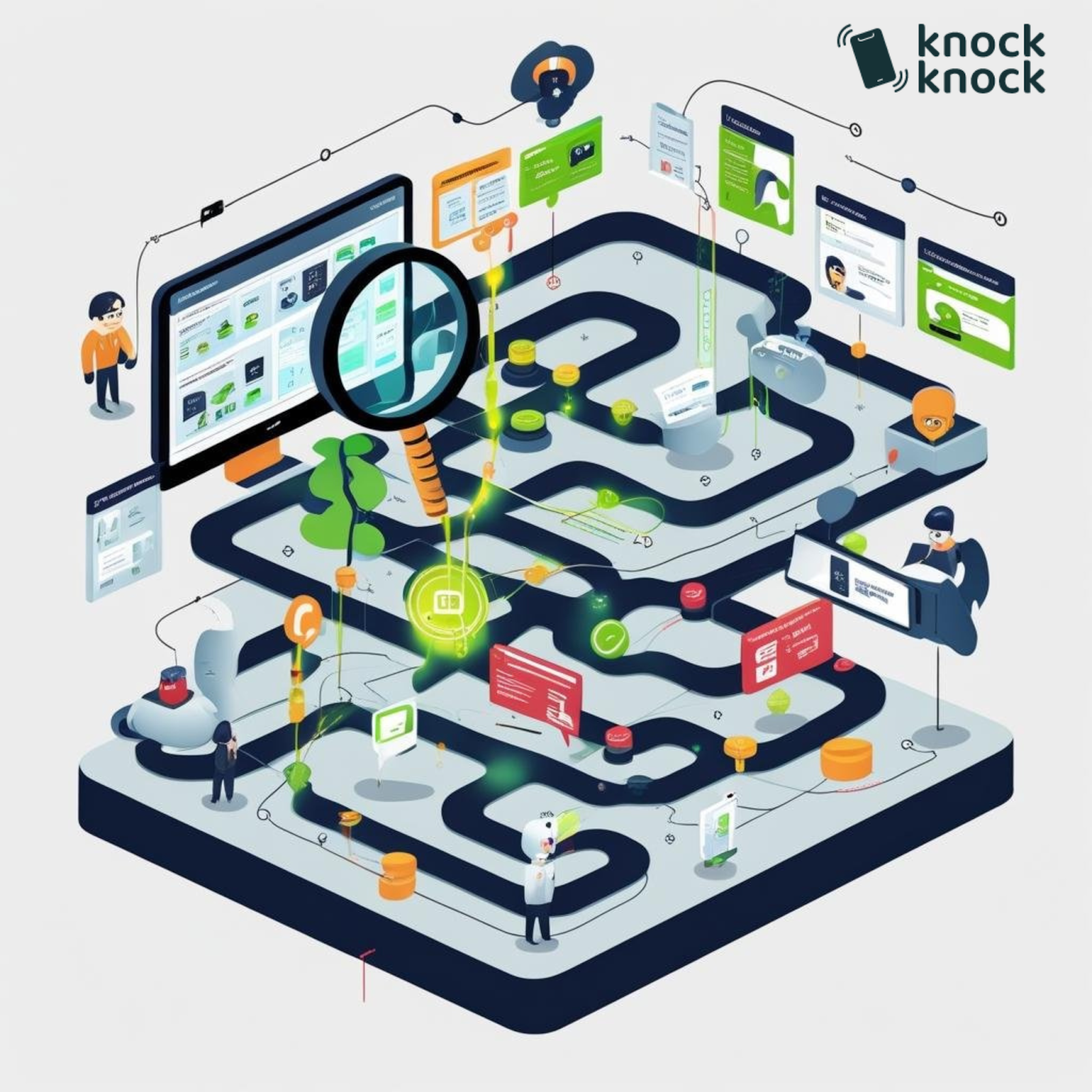
Every year, businesses spend significant amounts of money driving traffic to their websites.
Google Ads. Facebook campaigns. SEO. Content marketing. Influencer deals. Sponsorships.
Money pours in. Traffic pours in.
And then?
Many of those visitors leave without taking a meaningful action.
Not “didn’t buy.” Some don’t fill out a form. Don’t start a chat. Don’t call. Don’t sign up for email.
They came. They saw. They vanished.
Without the right visitor intelligence or engagement, you may never know who they were, what they wanted, or why they left.
They’re missed opportunities.
The Lie We’ve Been Told
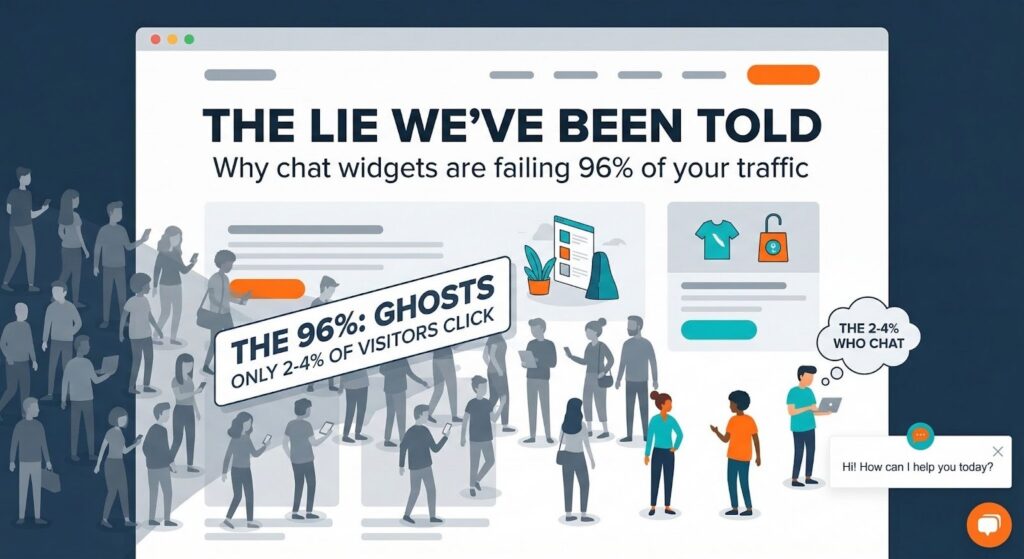
For two decades, one common solution has been the same: put a chat widget on your website.
Pop-up in the corner. “Hi! How can I help you today?”
And it can work.
Chat gives interested visitors another way to ask questions and communicate with a business.
So businesses added chat widgets. Problem solved, right?
Not necessarily.
Here’s what basic chat doesn’t always solve:
A chat widget still depends on visitors choosing to engage with it.
That means even a sophisticated AI chatbot may only interact with part of your website traffic. Other visitors may continue browsing without starting a conversation.
And even when visitors DO chat, here’s what can happen:
Customer: “Hi, I’m interested in your enterprise plan.”
Agent: “Great! I’d be happy to help. What questions do you have?”
Customer: “What’s included in implementation support?”
Agent: “Our enterprise plan includes 20 hours of dedicated support, priority access to our success team, and custom training.”
Customer: “OK thanks, I’ll think about it.”
Information delivered. Question answered.
But has enough trust been built to make a significant purchase?
Maybe not.
Would you spend $30,000 based only on a text conversation? Would you hire a consultant based only on chat bubbles? Would you trust your business to a company you’ve never spoken with directly?
For some buyers, text alone may not be enough.
Text is useful for information. Some sales conversations benefit from something more personal.
The Moment I Realized Everything Had Changed
I was on a website last year. Researching a tool for my business. $15,000 annual commitment.
I’d been on the site three times that week. Read every case study. Watched every video. Compared every plan.
I was ready to buy. I just had one question about implementation.
I clicked the chat. Got a bot. Asked my question. Got a canned response that didn’t quite answer it.
“Would you like to schedule a call with our team?”
Sure.
Earliest availability: next Thursday.
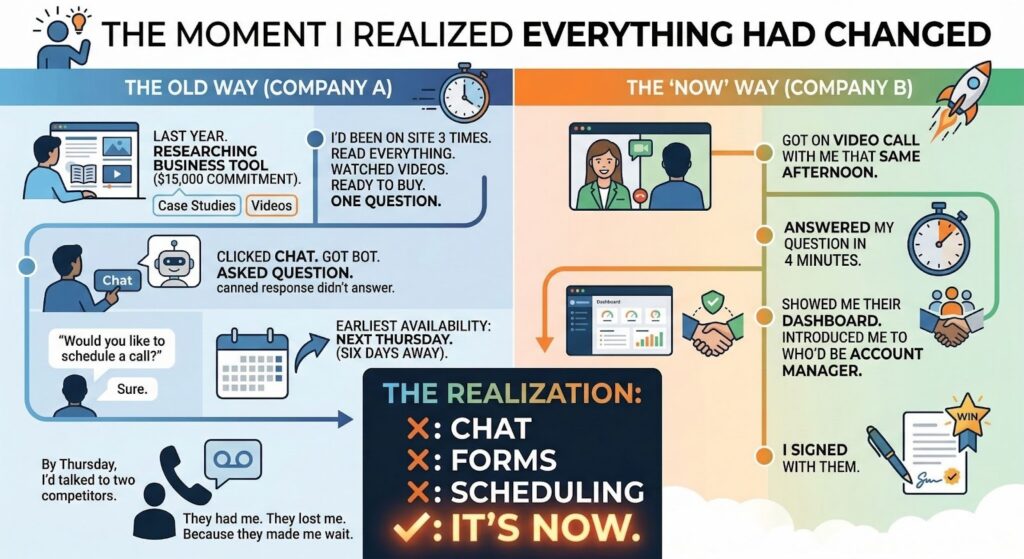
Six days away.
By Thursday, I’d talked to two competitors. One of them got on a video call with me that same afternoon. Answered my question. Showed me their dashboard. Introduced me to who’d be my account manager.
I signed with them.
The first company? They called Thursday as scheduled. Left a voicemail. I never called back.
They had an interested prospect. They lost the opportunity because the conversation didn’t happen when I needed it.
That’s when I understood: the future of website conversion isn’t only chat, forms, or scheduling.
Timing matters.
The Trust Hierarchy
Let me show you something that will change how you think about sales forever.
There’s a hierarchy of trust in human communication. It looks like this:
HIGHEST TRUST
↑
In-person meeting
↑
Live video call
↑
Phone call
↑
Video message (async)
↑
Voice message
↑
Text/email/chat
↑
LOWEST TRUST
The right channel depends on the customer, offer, and situation.
Text is useful for quick information. Phone calls add voice and tone. Live video adds visual communication and makes demonstrations and face-to-face conversations possible.
The pattern is simple: some buying decisions benefit from more direct human interaction.
But here’s the problem we’ve often accepted:
In-person meetings don’t always scale. Traditional video calls often require scheduling. Phone calls usually require exchanging numbers. So many websites default to text.
What if those limitations could be reduced?
What if you could have face-to-face conversations with interested website visitors while they’re still actively evaluating your offer?
No unnecessary back-and-forth. No waiting days for a scheduled conversation when someone is available now.
Visitor is on your website. Visitor is interested. Visitor has the option to speak face-to-face with your sales rep.
That’s what live video chat can enable.
It brings direct human interaction into the website experience in real-time.
The Difference Timing Makes
Let me tell you about two companies selling the same thing.
Company A (traditional approach):
- Visitor lands on website
- Browses for several minutes
- Clicks “Request Demo”
- Fills out form
- Gets auto-reply: “Thanks! Someone will contact you.”
- SDR follows up later
- May leave voicemail
- Sends follow-up email
- Eventually connects with visitor
- Schedules demo
- Demo happens later
Company B (live video chat):
- Visitor lands on website
- Browses for several minutes
- AI notices relevant intent signals and engages: “I see you’re comparing our Pro and Enterprise plans. Want me to show you the difference?”
- Visitor responds
- AI qualifies with configured questions
- Sales rep gets an alert, sees available visitor context, and joins the conversation
- Rep is now IN the conversation
- “Mind if I flip on video? This is way easier to show than explain.”
- Visitor accepts
- Face-to-face conversation begins while the visitor is still on the website
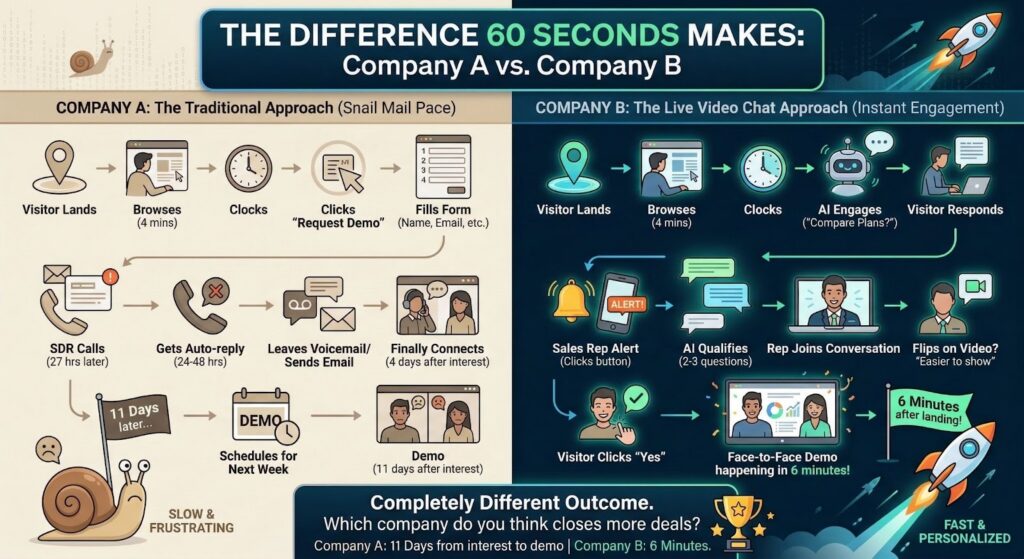
Company A: The conversation happens later.
Company B: The conversation can happen during the active website session.
Same visitor. Same product. Same interest level.
Completely different experience.
That difference in timing can matter when someone is actively evaluating a purchase.
The Science of “Right Now”
There’s a concept in sales called “speed to lead.”
The basic idea is straightforward: when a prospect expresses interest, responding while that interest is still active can create a better opportunity for conversation.
Waiting too long can create room for priorities to change, interest to cool, or another provider to respond.
Your competitors may be sending “thanks for your interest” emails. You could be starting a conversation while the visitor is still on your website.
That’s the advantage of timely engagement
Why Video Specifically?
When a prospect sees your face, watches a live demonstration, and asks questions directly, the interaction can feel different from a text-only conversation.
They’re not only evaluating information.
They’re interacting with a person.
And for some buying decisions, that personal interaction can matter.
The Objection That’s Actually the Opportunity
“But wait,” you’re thinking. “Won’t visitors find video intrusive? Won’t they hate being pushed into calls?”
They might, if video is forced on them.
That’s why the experience should give visitors a choice.
Some people don’t dislike video itself. They dislike the friction that can come with scheduling a formal video meeting.
The back-and-forth. “What time works for you?” “Actually, can we move it to Thursday?” “Something came up, can we reschedule?”
The anticipation. Blocking off 30 minutes. Wondering what the meeting will involve.
The commitment of a formal “meeting.”
But an optional video conversation while someone is already engaged and has questions can feel different.
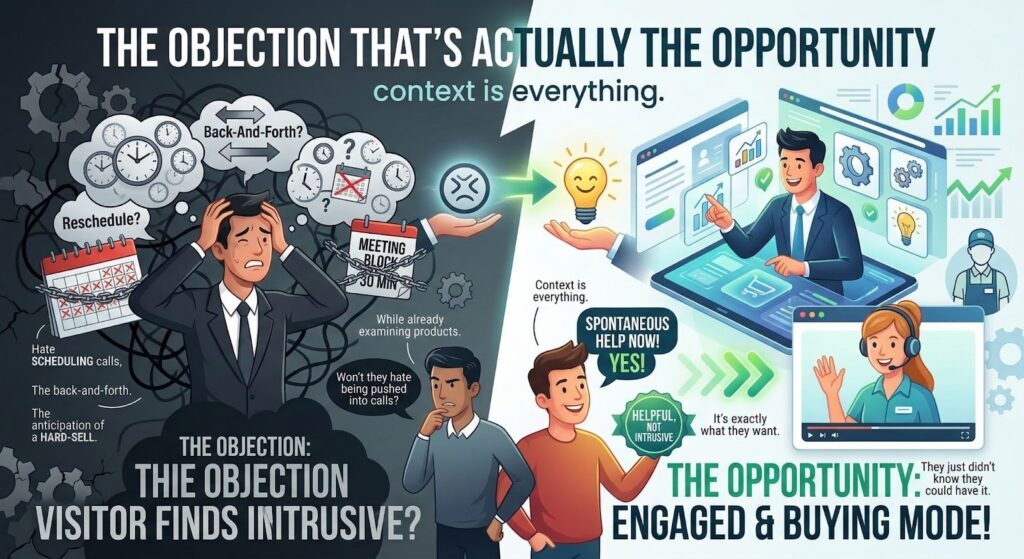
The goal isn’t to interrupt. It’s to make help available.
It’s the difference between a salesperson cold-calling you during dinner and a store employee being available while you’re examining a product.
Context is everything.
When someone is actively browsing your website, considering your product, and looking for answers, offering a face-to-face conversation can provide another way to get help.
They can decide whether they want it.
The Technology That Makes This Possible
Website engagement technology has evolved significantly.
Today, businesses can combine several capabilities within the same visitor experience.
Here’s what can make live video chat more useful:
1. Visitor Identification (Before They Do Anything)
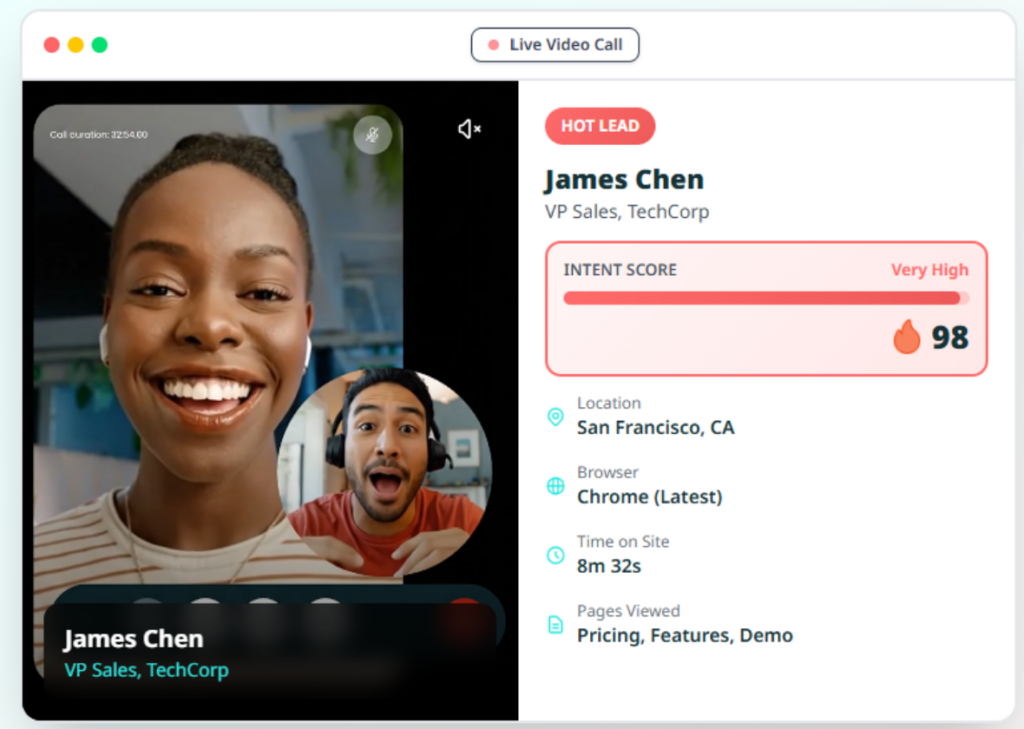
Available visitor intelligence can provide useful context before or during engagement.
Depending on the available data, this may include:
- Name or email
- Company or job information
- Social profile information
- Traffic source
- What pages they’ve viewed
- Whether a visitor has been recognized from a previous visit
Not every visitor will necessarily be identifiable, and the information available can vary.
When context is available, it can help make engagement more relevant than a generic “Hi, how can I help you?”
2. Behavior Tracking and Intent Scoring
Not every visitor needs the same type of engagement. Behavioral signals can help identify visitors who may be showing stronger interest.
These signals can include:
- Time on relevant pages
- Multiple visits
- Specific page sequences
- Scroll depth and engagement
- Other configured behavioral signals
These signals can be used as part of an intent-scoring process to help prioritize engagement.
3. AI That Engages Contextually
Generic chatbot conversations can create friction when they fail to understand what visitors need.
“How can I help you today?” gives the visitor very little context.
Contextual AI can use available information to create more relevant openings, for example:
- “I see you’re comparing our Professional and Enterprise plans. Want help understanding the differences?”
- “You’ve been looking at our manufacturing case studies. Are you evaluating a similar use case?”
- “You’re back! Is there anything specific you’d like help finding today?”
This kind of engagement can make the conversation more relevant to what the visitor is doing.
4. Seamless Human Takeover
AI can help start and qualify conversations. Humans can step in when their involvement is useful.
When an appropriate prospect appears, transitioning from AI to human should be straightforward.
Your sales rep can review the available conversation and visitor context before joining.
Then they can enter the conversation.
The goal is to avoid making the visitor unnecessarily repeat what they’ve already discussed.
5. Instant Video (No Friction)
“Mind if I flip on video? This is easier to show.”
Visitor accepts.
Supported video can start directly through the website experience.
The conversation continues, now face-to-face.
6. Camera Flip
Camera flip can be particularly useful when physical products, locations, equipment, or environments need to be shown.
Mid-call, you can switch from your front camera to your rear camera.
Now you’re showing:
- The product in your hands
- The property they’re considering
- Your facility or workspace
- The exact thing they’re asking about
Video chat becomes a live demonstration.
How Knock Knock App Does This
Knock Knock App was built to support this kind of website engagement.
It brings together visitor intelligence, behavioral context, AI engagement, human takeover, and real-time video engagement.
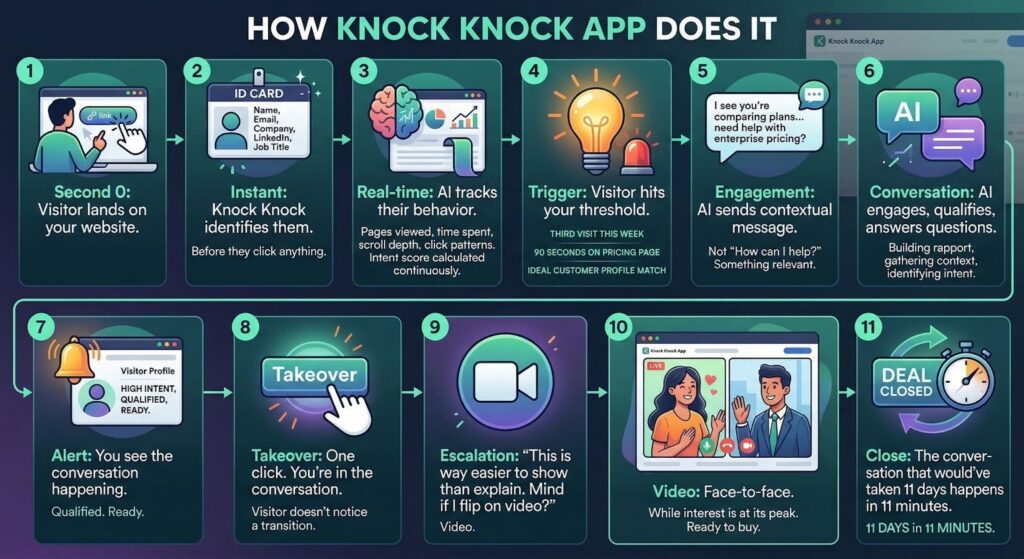
Here’s an example of how the flow can work:
Visitor lands: Someone arrives on your website.
Visitor context: Where available, Knock Knock can surface information about the visitor and their source.
Real-time: Relevant website behavior can be tracked as the visitor browses.
Trigger: Configured signals and criteria can determine when proactive engagement is appropriate.
Engagement: AI can send a contextual message based on available visitor information, behavior, and its configured instructions.
Conversation: AI can engage, answer supported questions, collect information, and help qualify the visitor.
Alert: Your team can review relevant visitor and conversation context.
Takeover: When appropriate, a human can step into the conversation.
Escalation: If a visual conversation would help, the visitor can be offered a live video interaction.
Video: Face-to-face communication can happen while the visitor is still on your website.
Next step: Your team can answer questions, demonstrate relevant features, and move the conversation toward an appropriate next step.
The Results
There isn’t one universal conversion number that applies to every business using live video.
Results depend on factors such as:
| Metric | What to Measure |
|---|---|
| Visitor-to-conversation rate | Compare engagement before and after implementation |
| Lead-to-opportunity rate | Track how engaged visitors progress through your funnel |
| Sales cycle length | Compare the time from initial interest to an outcome |
| Close rate | Measure qualified opportunities that become customers |
| Average deal size | Compare against your existing baseline |
Numbers don’t tell the full story, but your own data can show whether the experience is creating meaningful improvement.
The real opportunity is creating conversations with interested visitors who might otherwise leave without engaging.
The ones who were ready today but got sent to a calendar link for next week.
The ones who had one question but gave up on an unhelpful chatbot.
The ones who wanted a faster response.
The ones who were close to making a decision but still needed reassurance.
Some of those visitors may become opportunities when you make useful conversations easier to start.
Not because you changed your product. Not because you lowered your price. Not because you spent more on ads.
Because you gave them another way to communicate while they were actively interested.
Who This Is For (And Who It’s Not)
Live video chat can make more sense for some businesses than others.
This May Be For You If:
You sell higher-consideration products or services
As purchase complexity or commitment increases, prospects may have more questions before making a decision. Video can provide another way to answer those questions directly.
Your product requires explanation or demonstration
If prospects have questions that can’t easily be answered in a FAQ, video lets you show instead of tell. Screen sharing, product demos, and live walkthroughs can all be useful.
Trust is important to your sale
Professional services, consulting, real estate, and other relationship-driven industries can benefit from giving prospects opportunities for direct human interaction.
Response time matters in your sales process
If prospects often evaluate several providers at once, timely engagement can help your team start conversations while interest is active.
You have sales capacity during business hours
Someone needs to take these calls. If you have sales reps, account executives, or founders who can step into relevant conversations, live video can become another communication option.

This Is NOT For You If:
You sell low-ticket commodity products
For many low-cost, straightforward purchases, optimizing product pages and checkout may be more useful than introducing a live video conversation.
Your product is purely self-serve
If customers already buy successfully without speaking to anyone, adding human interaction to every journey may introduce unnecessary friction.
You have zero sales capacity
AI can handle parts of the conversation, but live video requires someone to be available when human involvement is needed.
You get very low traffic
If your website receives very little traffic, improving traffic acquisition may be a more immediate priority before optimizing live engagement.
The Real Competition
Here’s something worth considering:
Your competition isn’t only other companies selling what you sell.
You’re also competing on the experience your website provides.
When a prospect visits one website and gets a personalized, useful conversation, then visits another and gets a generic chatbot, they may notice the difference.
One experience can feel responsive and personal.
The other can feel generic or automated.
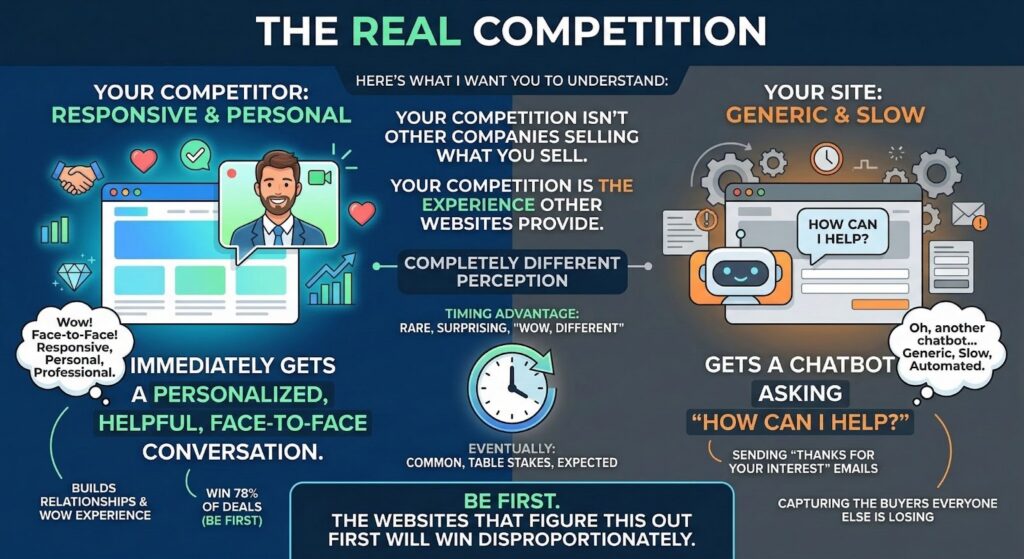
Same type of product. Similar pricing. Different experience.
Providing faster, more contextual engagement can become one way to differentiate your website.
That advantage depends on how well the experience is implemented and whether it actually helps visitors.
Getting Started
Here’s what implementing Knock Knock App can involve:
Initial setup: Install the required website component, connect supported systems, and configure your AI.
Early use: Monitor visitor engagement, AI conversations, and human takeovers.
Optimization: Refine triggers, qualification criteria, and team workflows based on actual conversations.
Ongoing: Measure engagement and conversion performance against your previous baseline.
The exact setup and optimization timeline will depend on your website, integrations, traffic, team, and configuration.
The opportunity is to test whether proactive, contextual engagement helps you create more useful conversations from the traffic you already have.
The Math
The financial impact of live video chat depends on your own numbers.
Instead of assuming a fixed ROI, use your actual:
- Website traffic
- Engagement rate
- Qualified lead rate
- Close rate
- Average deal value
- Platform and staffing costs
For example, if an engagement platform helps contribute to an additional deal that would otherwise have been lost, you can compare the revenue or profit from that deal with the cost of the platform.
The actual ROI will depend on your business and should be measured against your existing baseline.
That’s more useful than assuming every business will achieve the same return.
The Question
You’ve read this far because something may resonate.
Maybe you’ve lost deals after slow follow-up. Maybe you’ve watched qualified prospects leave. Maybe you’ve felt the frustration of investing in traffic that doesn’t convert.
Here’s the question:
Could you create more opportunities by making it easier for interested visitors to talk to your team?
Some visitors landing on your website today may be actively considering your offer.
Will you give them the option to meet you face-to-face?
Or will their only option be a form and a later follow-up?
Try It
Install it. Watch how visitors interact with your website. See the AI engage. Take over a conversation when appropriate. Try a video conversation with a prospect while they’re actively browsing your website.
Then evaluate the experience and results for yourself.
Book a Demo at knockknockapp.ai
Frequently Asked Questions
What is live video chat for websites? Live video chat allows website visitors to have face-to-face video conversations with your team directly through the website experience. Depending on the platform and configuration, this can reduce the need to move every conversation to a separately scheduled meeting.
How does video chat increase conversions? Video can provide a more direct way for visitors to ask specific questions, see demonstrations, and interact with a real person. Whether it improves conversions, and by how much, depends on factors such as your audience, offer, website experience, sales process, and how video is used.
Do visitors need to download anything? Knock Knock’s supported website video experience is designed to let visitors communicate through the browser without moving the conversation to a separate video conferencing platform. Exact browser and device requirements should be checked against the current product documentation.
What if visitors don’t want video? That’s fine. Knock Knock supports other communication options, including text, voice, and video where configured. Visitors can use the communication method appropriate to the experience you provide.
How do I know which visitors to engage? Behavioral and visitor signals can help inform engagement. These can include time on pricing page, return visits, specific page sequences, engagement depth. Your engagement and lead-scoring rules can then be configured around the signals that matter to your business.
What about after hours? AI engages visitors 24/7, qualifies them, answers questions, and captures contact information. High-value opportunities get flagged for immediate follow-up. You can enable mobile notifications to jump in from anywhere for truly hot prospects.
What’s the difference from Zoom or Google Meet? Scheduling. Video conferencing requires calendar invites and scheduled times. Live video chat happens instantly, while the visitor is on your website, while interest is highest. The timing difference creates a massive conversion difference.
How does camera flip work? Camera flip allows supported devices to switch between available cameras during a call. This can be useful for showing products, properties, equipment, or other physical environments during a live conversation.
What CRMs does Knock Knock integrate with? Knock Knock supports CRM and workflow integrations. Because available integrations can change over time, check the current integration options for the systems you use rather than assuming every CRM is supported in the same way.
What’s the ROI timeline? There isn’t a universal ROI timeline. Results depend on your traffic, offer, sales cycle, implementation, team usage, and existing conversion performance. Track conversations, qualified leads, opportunities, conversions, and associated revenue against your previous baseline to evaluate ROI.

Anna Hyatt
Co-Founder | Knock Knock App
AI × Human Touch = Happier Clients, More Revenue
LinkedIn Profile